




Best Practice #1
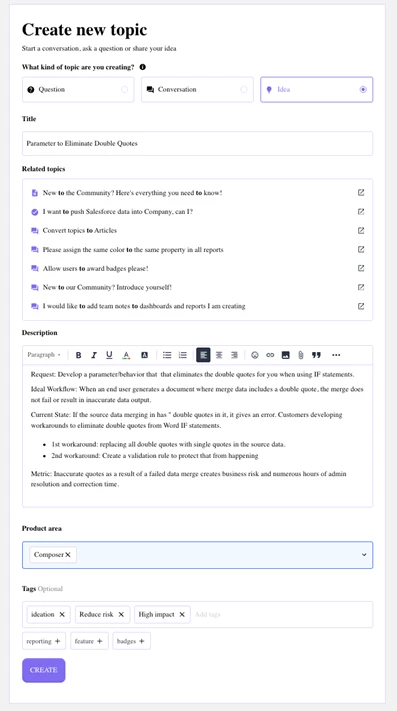
Provide a detailed description: Enter details that clearly define your Requirements. Ideally this should include:
- A clearly defined use case or business problem that is not met with current functionality. Include the functional job a user is trying to accomplish, the desired workflow, and industry context.
- For enhancement requests, provide detailed requirements for the functionality that you’re seeking and name the existing feature.
- You can include screenshots, links to related ideas, and product docs to explain why existing functionality does not meet your needs.
- Be detailed, illustrate as much as you can to bring out all the components. Make sure you are using all the Product area/module names you are aware of.
- Highlight the value this feature would bring for the broader community of users. Include metrics such as time to deals closing, decrease in manual entry, faster document generation, etc.
Best Practice #2
Select the right Product Area: Select the Product you want to Submit under from the Product Area dropdown and click submit.
Best Practice #3
Include Tags (optional): Contribute greatly to findability so make sure you fill out all the keywords and phrases as tags to your post. While adding tags to posts is optional, it is highly recommended that users do so.
Here’s an example of what the idea submission window looks like:
Let’s put on those thinking caps and go submit an idea!